
8 Bit Tower Defense Codes and How to Redeem Them
Where the CODES area lives in 8 Bit Tower Defense, how to redeem a code, what each reported code gives, and the group reward next to the Codes field.
Quick answer
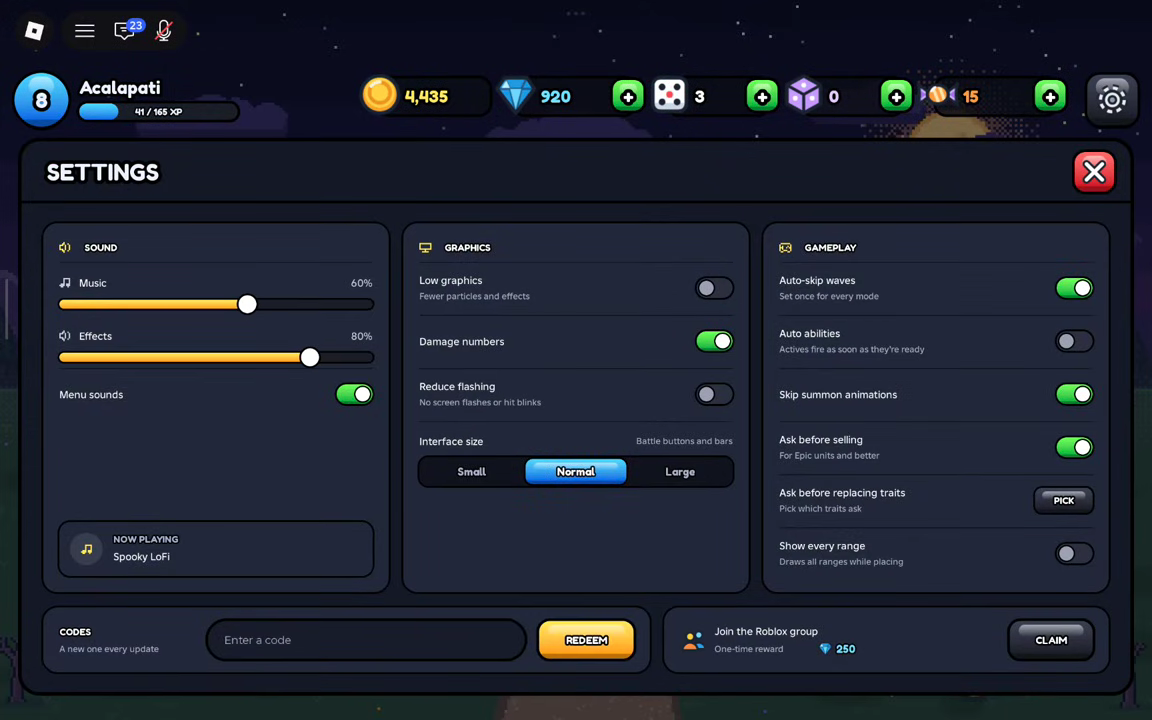
Every code in 8 Bit Tower Defense is redeemed from the same place: open Settings in the game, find the CODES area, type the code into the 'Enter a code' field and click REDEEM. The table below lists the codes reported working, together with the rewards each one gives and the date each status was last checked.
- Statuses come from reported listings: the date beside each code shows when that status was last confirmed, so a code can stop working before the next check.
- Below the Codes field there is a separate group-reward CLAIM button: +100 Gems and +1 Trait Reroll once you have liked the game and joined the Roblox group.
Code rewards in 8 Bit Tower Defense are paid in the game's main currencies, and a code that worked yesterday can be retired at any time. The table below lists the codes reported working, together with the rewards each one gives and when each status was last checked, so you can see at a glance what is currently claimable.
Codes reported working
FIRSTSTANDSource checked:
HALLOWEENSource checked:
HALLOWEENPT2Source checked:
HOLLOWHUNTSource checked:
OUTPOSTSource checked:
PIXELPOWERSource checked:
RELEASESource checked:
THANKSSource checked:
UPDATE1Source checked:
| Code (click to copy) | Rewards | Status | Source checked |
|---|---|---|---|
FIRSTSTAND | 500 Gems | Reported active | |
HALLOWEEN | 3,000 Gems25 Trait Rerolls25 Stat Rerolls | Reported active | |
HALLOWEENPT2 | 2,500 Gems10,000 Candy15 Trait Rerolls15 Stat Rerolls | Reported active | |
HOLLOWHUNT | 1,000 Gold | Reported active | |
OUTPOST | 300 Gems | Reported active | |
PIXELPOWER | 200 Gems2 Trait Rerolls | Reported active | |
RELEASE | 1,500 Gems | Reported active | |
THANKS | 3,000 Gems | Reported active | |
UPDATE1 | 2,500 Gems10,000 Gold15 Trait Rerolls15 Stat Rerolls | Reported active |
Code list at a glance
Reported statuses reflect source listings rather than an in-game test of every code. The check date shows when the list was last confirmed — a code can stop working between checks, and a listed code can be removed once it is reported expired.
How to redeem a code in 8 Bit Tower Defense
- Launch 8 Bit Tower Defense in Roblox.
- Open the Settings menu.
- Find the CODES area — a single field labeled 'Enter a code' with a REDEEM button next to it.
- Type your code into that field and click REDEEM.
That is the whole procedure. Every code on this page uses the same field, so once you know where Settings keeps its CODES area, redeeming a new code later takes only a few seconds.
The group reward next to the Codes field
The CODES area in Settings holds one more free reward, and it is not a code. Directly below the Codes field, the game shows a 'Join the Roblox group' line — like the game and join the group for free gems — with its own CLAIM button. The button label lists +100 Gems and +1 Trait Reroll among its rewards.
This reward pays through the CLAIM button itself once you have liked the game and joined the Roblox group, so nothing gets typed into the Codes field. It is a separate payout from code redemption, and you can collect it in the same visit to Settings. For more on that reward, see the group reward guide.
What the code rewards are used for
The currencies these codes pay are the backbone of building a stronger squad. Gems summon new units, Gold backs your upgrades, and Trait and Stat Rerolls let you roll better grades and traits on the units you already own. Candy is the limited event currency behind the game's seasonal celebrations, and it appears as a code reward when an event code grants it.
If you want to put those rewards to work, the units list shows what you can summon, the traits guide explains what Trait Rerolls are rolling for, and the dedicated pages on how to get gems, how to get gold, trait rerolls and stat rerolls cover the other ways to earn each currency.
Codes that have been reported expired move to the archive below. An expired code no longer pays anything when redeemed.
Expired and archived codes
No codes are currently listed as expired.
Where reported codes come from
Reported code lists are checked against public code listings for this game. Each code's check date in the table above is the last day its status was confirmed, and the list below shows those sources with their per-code check records.
Sources and check records
Reported statuses reflect source listings. Tested statuses reflect in-game redemption checks. Source-check dates are shown beside each code.
- destructoid.com
FIRSTSTAND· Source checked:HALLOWEEN· Source checked:HALLOWEENPT2· Source checked:HOLLOWHUNT· Source checked:OUTPOST· Source checked:PIXELPOWER· Source checked:RELEASE· Source checked:THANKS· Source checked:UPDATE1· Source checked:
- gamepur.com
FIRSTSTAND· Source checked:HALLOWEEN· Source checked:HALLOWEENPT2· Source checked:HOLLOWHUNT· Source checked:OUTPOST· Source checked:PIXELPOWER· Source checked:RELEASE· Source checked:THANKS· Source checked:UPDATE1· Source checked:
- progameguides.com
FIRSTSTAND· Source checked:HALLOWEEN· Source checked:HALLOWEENPT2· Source checked:HOLLOWHUNT· Source checked:OUTPOST· Source checked:PIXELPOWER· Source checked:RELEASE· Source checked:THANKS· Source checked:UPDATE1· Source checked:
- game-zoom.net
FIRSTSTAND· Source checked:HALLOWEEN· Source checked:HALLOWEENPT2· Source checked:HOLLOWHUNT· Source checked:OUTPOST· Source checked:PIXELPOWER· Source checked:RELEASE· Source checked:THANKS· Source checked:UPDATE1· Source checked:
Related Guides
Group Reward CLAIM
Like the game and join the Roblox group, then claim +100 Gems and rerolls from Settings.
Stat Rerolls
Get Stat Rerolls from codes like UPDATE1 and HALLOWEEN and spend them on unit stat grades.
Trait Rerolls
Claim Trait Rerolls from codes and the group reward, then spend them in a unit's TRAITS tab.
How to Get Gems
Earn Gems from Index rewards, quests, the group bonus and codes, then spend them on summons.