
How to Sell Units in 8 Bit Tower Defense Without Selling a Keeper
Selling a unit in 8 Bit Tower Defense works on units placed during a match. Check the shown sale value first and keep 'Ask before selling' on so you never lose a unit you meant to keep.
Quick answer
Select the unit you placed on the map during a match and use its Sell action - and keep the 'Ask before selling' toggle on in Settings > GAMEPLAY so the game asks you to confirm before every sale.
- Selling works on units you have placed on the map during a match; selecting a placed unit shows its current sale value.
- 'Ask before selling' sits in Settings > GAMEPLAY, alongside options like 'Auto-skip waves' and 'Auto-abilities'.
- A sold unit frees its placement spot, so you can place another unit in that position right away.
How to sell a unit during a match
Selling is an in-match action for units you have already placed on the map. The flow:
- Select the placed unit you want to remove.
- Check its sale value first. Selecting a placed unit shows what it sells for - in one observed match, a unit displayed 'sells for 840'. That number was the value for that specific unit at that moment, not a universal price, so always read it before you commit.
- Press Sell. The unit comes off the map and its spot opens up immediately, letting you place a different unit there.
That spot-freeing behavior is the practical reason to sell: if a unit is standing in the wrong place or you would rather have a different unit covering that part of the map, selling lets you swap it without losing the placement. In the reviewed footage, the player selected a placed unit, saw that it 'sells for 840', pressed Sell, and immediately placed a different unit in the same area.
The setting that prevents accidental sales
The direct answer to 'how do I avoid selling a unit I want to keep' is a built-in toggle: Settings > GAMEPLAY > 'Ask before selling'. The toggle sits in the GAMEPLAY menu next to related options such as 'Auto-skip waves', 'Auto-abilities', 'Skip summon animations', 'Ask before traits', 'Ask before trait rerolls' and 'Show every range', so it is easy to find.
With 'Ask before selling' enabled, the game asks before a sale goes through, which means a stray tap on a unit you meant to upgrade or reposition cannot silently remove it. If you sell units only when you truly intend to, leave this toggle on and confirm each sale deliberately.
Telling keepers from sell candidates
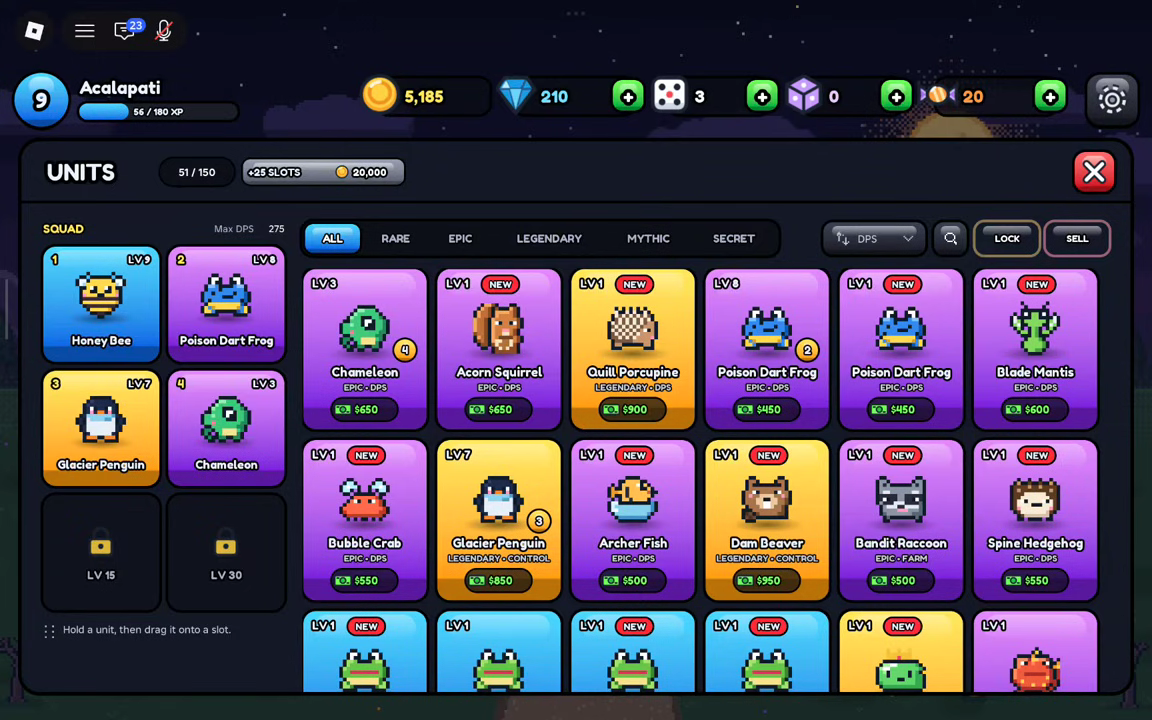
The safest habit starts before the match. The Units inventory lists every unit you own with rarity filter tabs - ALL / RARE / EPIC / LEGENDARY / MYTHIC / SECRET - and each card shows the unit's trait description. Reviewing your collection there means that when you are mid-match and a placement spot needs a swap, you already know which unit on your map is dispensable and which one you are building around.
One scope note: the Sell action covered here applies to units placed on the map during a match - that is the situation where the game shows a sale value and the Sell option. If you are still deciding which units to bring into a match in the first place, the units list and unit rarities guides help you judge your collection, and how to place units covers getting them onto the map in the right spots.